
RehabPath helps you keep your rehabilitation plan, daily activity, symptoms, notes, and progress in one calm place. It is built for people following guidance from a physio, clinician, or therapist, with privacy-first local storage and optional reviewed AI tools for importing a plan or preparing a clinician summary.
No RehabPath account. No cloud sync. No analytics. Your recovery records stay on your device by default, and optional AI features only send reviewed, redacted content when you choose to use them.
Inside RehabPath
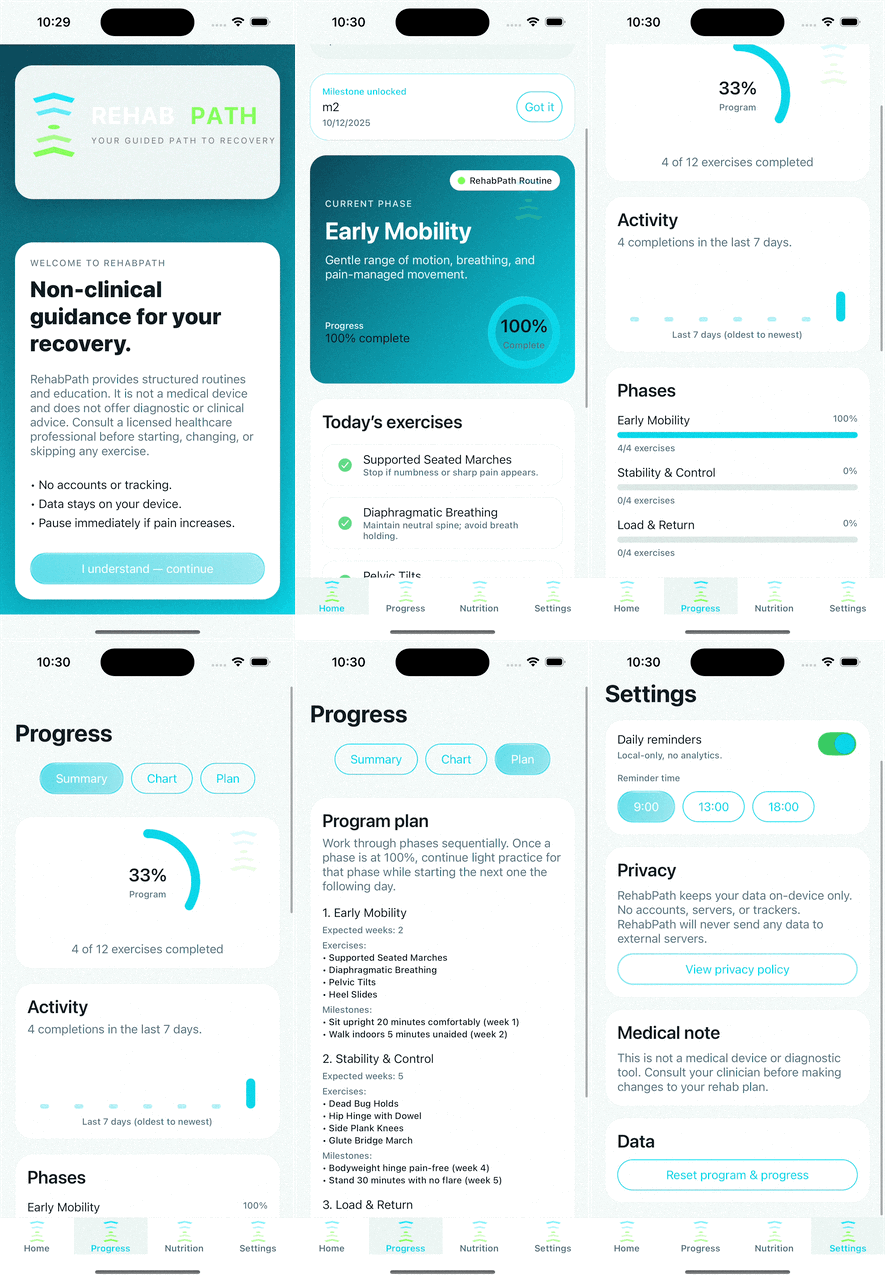
Follow your own rehab plan, log how recovery is going, and create clear progress packs for appointments.
Key Features
Custom Plans
Create your own rehab plan manually or import a selectable-text PDF from your clinician. RehabPath reads the PDF text on your device, redacts detected personal details, and shows you exactly what will be sent before AI structures it into a plan.
Daily Recovery View
See today's exercises and activities in one place. Mark items complete, skip difficult days with context, and keep your routine visible without streak pressure.
Symptom & Activity Logging
Record activity, pain, stiffness, fatigue, mood, sleep, confidence, and notes over time. Keep the day-to-day detail that is easy to forget between appointments.
Progress Overview
Review recent activity, symptom trends, milestone status, and recovery patterns in a simple timeline-style view.
Clinician Progress Pack
Export a patient-generated PDF summary for your physio or clinician. Choose the date range and sections to include, such as activity summary, symptom trends, milestones, notes, and activity log.
Optional AI Summary
Generate a plain-English summary for your clinician pack from structured app metrics. Your written notes are not sent to the AI summary feature, and you review and edit the summary before it is included.
Encrypted Backup
Create an encrypted backup file when you choose. RehabPath does not receive the backup file and cannot recover your passphrase if it is lost.
Privacy-First
RehabPath stores your recovery data locally by default. There are no RehabPath accounts, no cloud sync, no analytics, and no advertising trackers. Optional AI features require an internet connection and send only reviewed, redacted content for the selected task.
FAQ
Is RehabPath a replacement for physio?
No. RehabPath is a self-guided logging and organisation tool. It does not provide medical advice, diagnosis, treatment recommendations, clinical decision support, or emergency help. Always follow the guidance of your clinician or therapist.
Can I use my own plan?
Yes. RehabPath is currently focused on custom plans. You can enter your plan manually or import a selectable-text PDF and review the structured result before saving it.
Does PDF import work with scans or photos?
Not yet. The current import feature supports PDFs with selectable text. Scanned documents, photos, and handwritten-note OCR are not supported in this release.
Where is my data stored?
Your app data is stored locally on your device by default. Optional encrypted backups and clinician pack PDFs are exported only when you choose. Optional AI features send limited, reviewed, redacted content through RehabPath's AI gateway and OpenAI for the selected task.
Does RehabPath send my notes to AI?
For plan import, you review the redacted PDF text before it is sent for structuring. For AI clinician summaries, written notes are not sent to the AI summary feature; the summary is generated from structured metrics such as activity counts, symptom scores, and milestones.
Is there a cost?
For the current trial build, custom plan use is free. Paid programme paths are not part of this launch experience.